Lab Activity 2
https://lab2-starter.webgencode.repl.co/
Week 2 (2/14 – 2/20): HTML Forms Review + PHP Form Input/Output
This week’s concept was :
- Understand basic PHP syntax and variables
- Declare a variable and assign a value to it
- Output that variable
- Understand basic conditional operators (if, elseif, else)
- Create an HTML form
- Read values from an HTML form and store them to a PHP variable
PHP (Hypertext Preprocessor) runs in the background of websites, that is, on the server side, performing some operations. Processes written in PHP are interpreted by browsers and some results are produced here. With these results, scripting languages such as HTML, CSS or JavaScript are provided to be more visual and useful. Websites coded in this way are also called dynamic websites.
This weeks assignments were Lab Activity 2 and Web Project 1: Mission to Mars Volunteer Form . It was easy to use html when creating the form. Because before Php class I learnt how to use html, CSS and JScript. I created a second file named process_registration.php which will process the form data and output a confirmation of the field selections. While I was creating the content of this file, I didn’t understand what was needed for a moment, but then there was the A-HA moment. It was great to see that the codes I prepared were working. It was best that the page that opened after submit button was working.
Some spots:
1-)
<form action=”page to submit form” method=”method to submit form’s data”>
the elements of the form will come here.
2-)
</form>
- Each form element must have a “name” parameter. This parameter specifies the name of that element. Thanks to the name we will write to this parameter of each form element, we find it in PHP.
- Likewise, we use the “value” parameter to set the default form element value or to set the value of the radio buttons. The values we write to this parameter determine the value of that element in PHP.
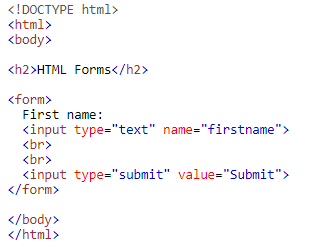
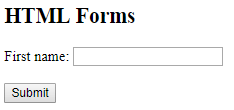
Result:
3-)
Multi-line Input Text Control, input control type allows the user to enter data of multiple lines. Typical usage of such input controls is for comments, addresses, description and so on.

Result:

I used w3school for some codes and it was helpful like always https://www.w3schools.com/PHP/php_form_complete.asp